FOR LONG-LIVED FILE LIBRARIES

Context stays.Files move.

Give assets, product imagery and project files tags, ratings and Markdown notes. After a rename, move or drive change, Moxua Mark helps reconnect the context you have built.

Windows 10 / 11Your library stays on your PC

The free edition includes the complete core workflow.View release notes →

Keep what you have learnedAfter a rename or move, the context you built can reconnect.
Your library stays yoursFiles, tags and notes stay under your care on your PC.
Grows with your workAs your library grows, its context grows with it.

WHY FILE IDENTITY

Paths change. File identity should not get lost.

Traditional path-based tagging ties your work to where a file is. Moxua Mark ties it to which file it is. That is the difference that keeps your organization available after a move.

Scenario
Traditional path-based tagging
Moxua Mark
Rename or move on the same drive
A changed path can break the old association and force rework.
NTFS file identity reconnects tags, ratings and notes automatically.
Move to another drive
Once the old path fails, manual file-name searches are often the only option.
Quick-hash content fingerprints verify candidates and help recover your existing organization.
Build a lasting library
The more files move, the harder path-based associations are to maintain.
Let files move freely while tags, ratings and notes stay connected to the file itself.

Lightweight is only the baseline.

Using fewer resources matters, but the real freedom is not being locked into one folder structure just to preserve your work. Local and lightweight are the basics; persistent file identity is the difference.

ORGANIZE WHAT YOU FIND

Organize what happens after you find a file.

Everything finds file names fast. Moxua Mark organizes what happens next: tags, ratings, notes and long-term file tracking.

01 · FILE IDENTITY

File identity,
not just paths.

Rename and move files on the same drive without losing your work. Cross-drive recovery checks content fingerprints instead of guessing by name.

RENAMEStay connected after a rename
MOVECarry context on the same drive
RECOVERVerify a cross-drive candidate
02 · WORKSPACE

Tags, ratings and notes
in one workspace.

Board-based tagging, flexible rating systems and Markdown notes for creators, sellers and designers with growing libraries.

03 · LOCAL BY DESIGN

Your library stays on your computer.

A single SQLite library keeps your files, tags and notes on your computer. Payments and licensing use only your email, order details and a random install ID.

A CALMER WORKFLOW

Let files move. Keep your organization.

Shift the question from “Where did I put it?” to “Is this the file I need?”

01

Find the file

Start from a familiar folder, search result or existing library. Moxua Mark does not demand a new way of working.

02

Leave useful context

Capture tags, ratings and Markdown notes together, so you do not need to rediscover why the file matters later.

03

Let it move freely

After a rename, a move or a drive change, file identity and content fingerprints help reconnect the original organization.

REAL WORKSPACE

See the whole library, without the clutter.

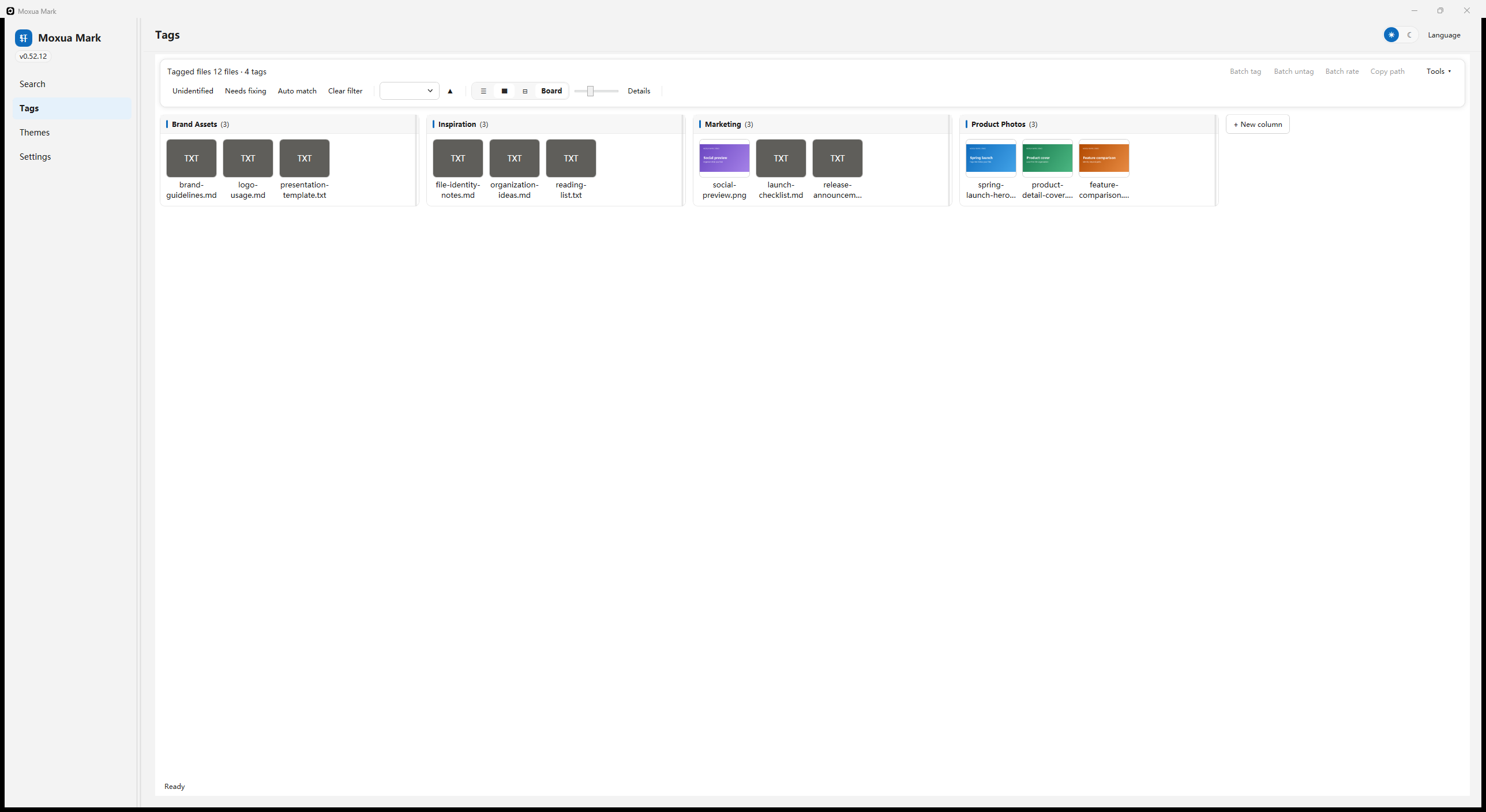
A board view for understanding where assets belong and what needs your attention next.

Moxua Mark Tags workspace showing four tag columns and twelve demo assets in English
Tags and board workspace.

Browse Brand Assets, Inspiration, Marketing and Product Photos in one place. Open a file for details, or adjust the card-size slider to switch between compact scanning and larger visual previews.

Example only: every file and tag shown is fictional demo data, captured with the English interface. No personal library information is included.

CONTINUOUS DEVELOPMENT · LONG-TERM VISION

Beyond tagging, with the goal of building the best file manager.

Moxua Mark will keep evolving. File identity and tagging are the starting point. Next, we plan to connect optional model capabilities and explore a new kind of file organization layer.

01Always evolving

More complete file management

Keep improving file browsing, batch organization, intelligent search and automation rules for a smoother workflow from discovery to reuse.

Near-term and ongoing development
02Model integration · Planned

Models that understand your organization goals

Connect optional model capabilities for assisted tagging, semantic search, classification and summaries. Local-first principles and explicit consent remain central.

AI and model capabilities
03File system · Long-term vision

From managing files to reorganizing how files work

Make file identity, tags, relationships and intelligent retrieval foundational, gradually exploring an experience beyond fixed folder hierarchies.

A file organization layer for the future
04Teams & Enterprise · Exploring

Shared context for every asset

For shared, cross-functional libraries, we are exploring common tags, naming rules, asset states and role-aware workflows—while keeping data ownership and deployment control with the organization.

Team workflows and controllable deployment

This roadmap describes development directions and long-term ambitions, not features already available in the current version. Specific capabilities and release dates will be confirmed in official release notes.

SIMPLE LICENSING

One-time purchase. Simple licensing.

Try the complete workflow for free. Upgrade when you are ready to manage a larger library.

Free

$0
  • All current core features, including cross-drive recovery
  • Up to 300 files and folders per library
  • Unlimited tags
  • Only new entries are blocked beyond the limit; existing data remains editable and exportable
Download
Early bird

Pro · One-time
purchase

$8.99 $14.99
  • Unlimited files and folders
  • Pay once, no subscription
  • Use on your own personal devices
  • Offline activation, no Moxua account
  • Major-version updates included
Checkout coming soon

Final pricing and update terms are governed by the checkout page and license agreement available at launch.

WHEN PRO OPENS

From checkout to activation in three steps.

01

Check out securely

Pay through the hosted global checkout. Sales tax and VAT are handled by the merchant of record.

02

Get your license code

Your code appears on the confirmation page and is emailed to your checkout address. No separate registration form.

03

Activate offline

Paste the code in Settings → License → Activate Pro. No Moxua account or password is needed.

The current version never uploads your files, file names, tags or notes. You go online only for downloads, update checks, payments and the activation, device-reset or deactivation actions you choose. A network outage does not lock features that are already activated. If a future optional model feature uses an external service, it will be explained separately and require your consent.

FAQ

Frequently asked questions.

Do I need an account or another registration form?

No. Your checkout email is used for the receipt, license delivery and ownership verification if you need a device reset or support.

What happens when I change computers?

You can deactivate the current device online. Resetting other devices or reissuing a code uses verification through your checkout email—no password required.

What about refunds and support?

Delivered digital license codes are generally final, with exceptions for legal requirements, duplicate charges, and unresolved delivery or activation failures. Read the Refund Policy. Support: support@moxuamark.com.

Does file tracking work on every drive?

Real-time identity tracking requires NTFS. Cross-drive recovery uses quick-hash content fingerprints to verify candidates rather than assuming that identical names and sizes mean the same file.